Playbooks and Tasks
If an Inventory is the "Address Book" of your servers, a Playbook is the "Instruction Manual." Playbooks are where you define the Desired State of your infrastructure using a simple, human-readable language called YAML.
At CodeHarborHub, we use Playbooks to ensure that every server in our cluster is configured exactly the same way, every time.
Playbooks allow you to automate complex tasks across multiple servers with a single command. They are idempotent, meaning you can run them multiple times without causing unintended changes. This makes them essential for maintaining consistency and reliability in your infrastructure.
The Anatomy of a Playbook
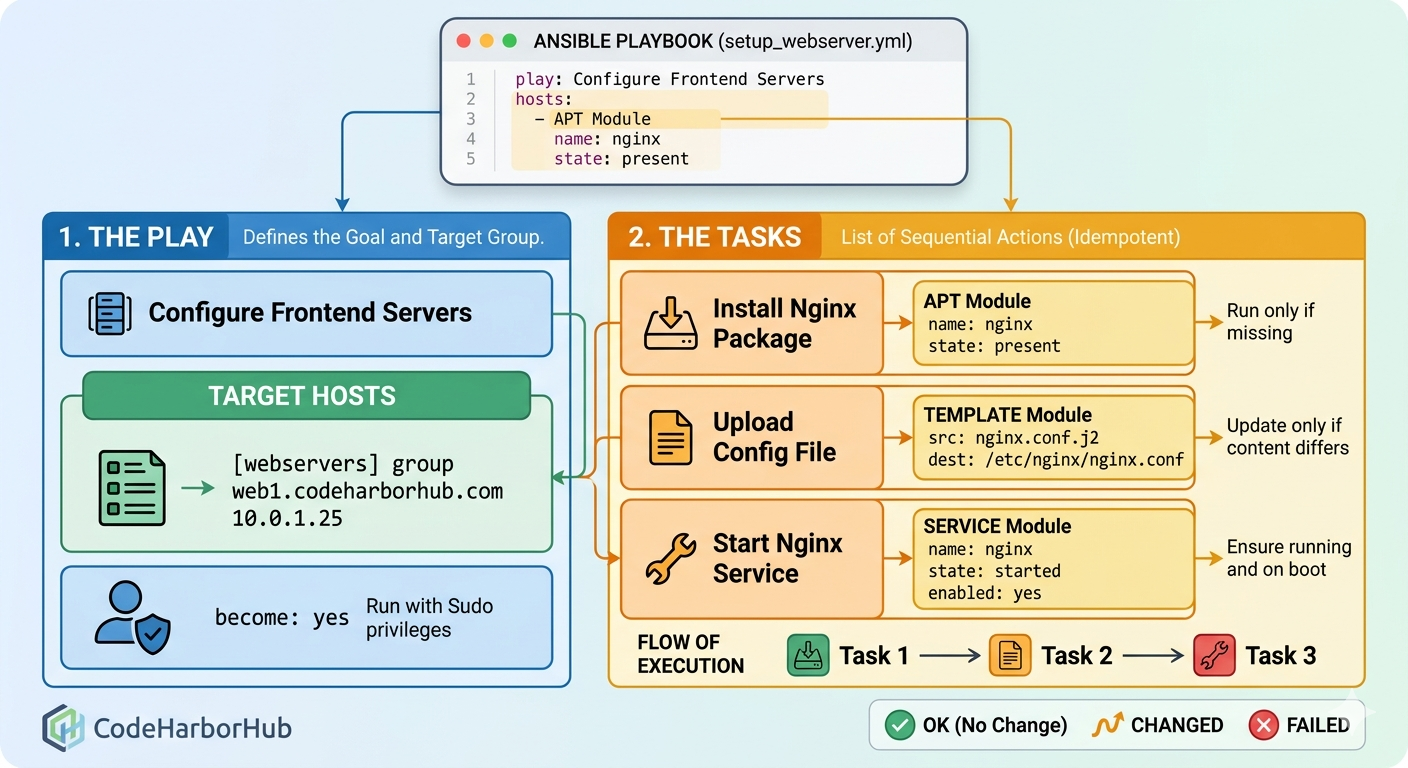
A Playbook consists of one or more Plays. A Play maps a group of hosts to a list of Tasks.
A Standard Web Server Playbook
Create a file named setup-webserver.yml:
---
- name: Configure CodeHarborHub Frontend
  hosts: webservers
  become: yes # Run as sudo/root

  tasks:
    - name: Ensure Nginx is installed
      apt:
        name: nginx
        state: present

    - name: Start Nginx service
      service:
        name: nginx
        state: started
        enabled: yes
In this example, we have a single Play that targets the webservers group. It has two tasks: one to install Nginx and another to start the Nginx service. Notice how we use the apt module to manage packages and the service module to manage services. Each task has a descriptive name, making it easy to understand what the playbook does at a glance.
Always use become: yes for tasks that require elevated privileges (like installing software or modifying system configurations). This ensures your playbook can run successfully on servers where you don't have direct root access.
Understanding Tasks and Modules
A Task is the smallest unit of action in Ansible. Every task calls an Ansible Module.
| Component | Purpose | Example |
|---|---|---|
| Name | Describes what the task does (shown in logs). | name: Install Node.js |
| Module | The specialized tool used for the task. | apt, yum, copy, git. |
| Arguments | The specific settings for that module. | name: nodejs, state: latest. |
The Idempotent Execution Flow
When you run a Playbook, Ansible executes tasks sequentially. For each task, it reports the status back to you.
Essential Modules for Full-Stack Devs
To build an "Industrial Level" MERN stack environment, you will frequently use these modules:
- Package Management
- File Management
- Source Control
Modules: apt (Ubuntu/Debian) or yum (CentOS/RHEL).
- name: Install Node.js
  apt:
    name: nodejs
    state: present
    update_cache: yes
Modules: copy (Transfer local files) or template (Dynamic files).
- name: Upload Nginx Config
  copy:
    src: ./nginx.conf
    dest: /etc/nginx/sites-available/default
Module: git.
- name: Pull latest code from CodeHarborHub
  git:
    repo: 'https://github.com/codeharborhub/tutorial.git'
    dest: /var/www/html
    version: main
Running Your First Playbook
Once your YAML file is ready, use the ansible-playbook command:
# Syntax: ansible-playbook -i <inventory> <playbook_file>
ansible-playbook -i hosts.ini setup-webserver.yml
Before making real changes to your production servers, always run a simulation:
ansible-playbook -i hosts.ini setup-webserver.yml --check
This will show you exactly what would change without actually touching the servers.
Ansible will report each task as OK (already in desired state), CHANGED (action taken), or FAILED (something went wrong). This feedback loop is crucial for debugging and ensuring your playbooks work as intended.
Best Practices for Tasks
- Meaningful Names: Always start your task names with a verb (e.g., "Install...", "Configure...", "Verify...").
- Use Handlers: If you change a configuration file, use a
handlerto restart the service only when a change is detected. - State Matters: Prefer
state: present(ensure it exists) orstate: latestoverstate: absentunless you are specifically uninstalling software.
Learning Challenge
- Create a playbook that installs
htopandcurlon your local machine. - Add a task to create a directory named
/tmp/codeharborhub-test. - Run the playbook twice. Observe how the second run shows "OK" (no changes) because the tasks are idempotent!