Parts of a CSS Rule
To write clean, predictable stylesheets, you need a precise understanding of CSS syntax. A stylesheet consists of individual rule sets (often called rules) that instruct the browser how to style specific elements in the document tree.
Anatomical Breakdown of a CSS Rule
A single CSS rule set is composed of five distinct components:
h1 {
  color: #2563eb;
  font-size: 2rem;
}
Where:
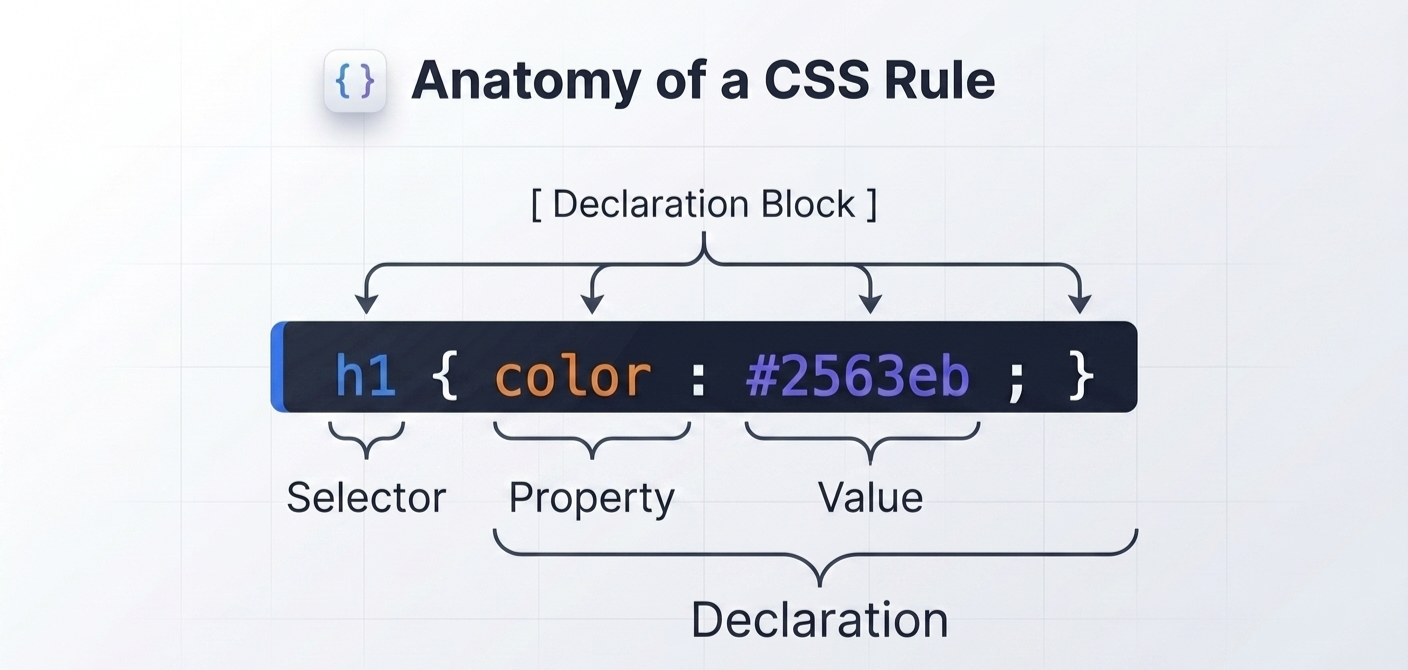
| Component | Code Segment | Description |
|---|---|---|
| Selector | h1 | The target pattern that tells the browser which HTML elements to style. |
| Declaration Block | { ... } | The pair of curly braces containing one or more style declarations. |
| Property | color, font-size | The specific human-readable visual characteristic you want to change. |
| Value | #2563eb, 2rem | The specific parameter or metric assigned to a property. |
| Declaration | color: #2563eb; | A single property-value pair separated by a colon (:) and terminated by a semicolon (;). |
Detailed Component Analysis
1. The Selector
The selector sits outside the declaration block. It can target elements based on their tag name, class name, ID, attributes, relationship in the DOM tree, or dynamic user interaction states.
/* Element Selector */
p { line-height: 1.6; }

/* Class Selector */
.card { padding: 1rem; }

/* ID Selector */
#main-header { background-color: #0f172a; }
2. The Declaration Block
Enclosed by opening { and closing } curly braces, the declaration block acts as a container for all style rules applied to the selector.
.badge {
  /* Everything inside these braces is the declaration block */
  display: inline-block;
  padding: 0.25rem 0.5rem;
  font-weight: 600;
}
3. Properties and Values
A property names the feature (e.g., margin, background-color, border-radius), while a value sets its visual outcome. Values can take many forms:
- Keywords:
bold,flex,relative,center - Numeric Units:
16px,1.5rem,50%,2vh - Colors: Named colors (
navy), Hex values (#2563eb), RGB/RGBA (rgb(37, 99, 235)), HSL/HSLA (hsl(221, 83%, 53%)) - Functions:
calc(100% - 2rem),var(--primary-color),linear-gradient(...)
Every declaration must end with a semicolon ;. Omitting a semicolon causes the parser to merge two consecutive declarations together, rendering both invalid.
Interactive Playground: Dissecting a Rule
Use the editor below to modify the selectors, properties, and values inside the declaration block. Observe how changing property parameters alters the live preview instantly:
Common Formatting Practices
While whitespace (spaces, tabs, line breaks) is ignored by the CSS parser, clean formatting improves readability and team collaboration on platform projects:
Single-line vs. Multi-line Rules
/* Multi-line Format (Recommended for readability) */
.user-avatar {
  width: 48px;
  height: 48px;
  border-radius: 50%;
  object-fit: cover;
}

/* Single-line Format (Used occasionally for small utility classes) */
.text-center { text-align: center; }
.hidden { display: none; }
Stick to multi-line rules with 2-space indentation for regular components. Keep property names in lowercase and always include a space after the colon separating properties from values (color: #2563eb;).
Summary Checklist
| Concept | Structure | Quick Example |
|---|---|---|
| Rule Set | Selector + Declaration Block | h1 { color: red; } |
| Selector | Targets DOM node(s) | .button, #app, div |
| Declaration | Property + Value pair | font-size: 16px; |
| Delimiter | Separates property & value | : (Colon) |
| Terminator | Concludes a declaration | ; (Semicolon) |